What Gives This Style a Film-Like Feel
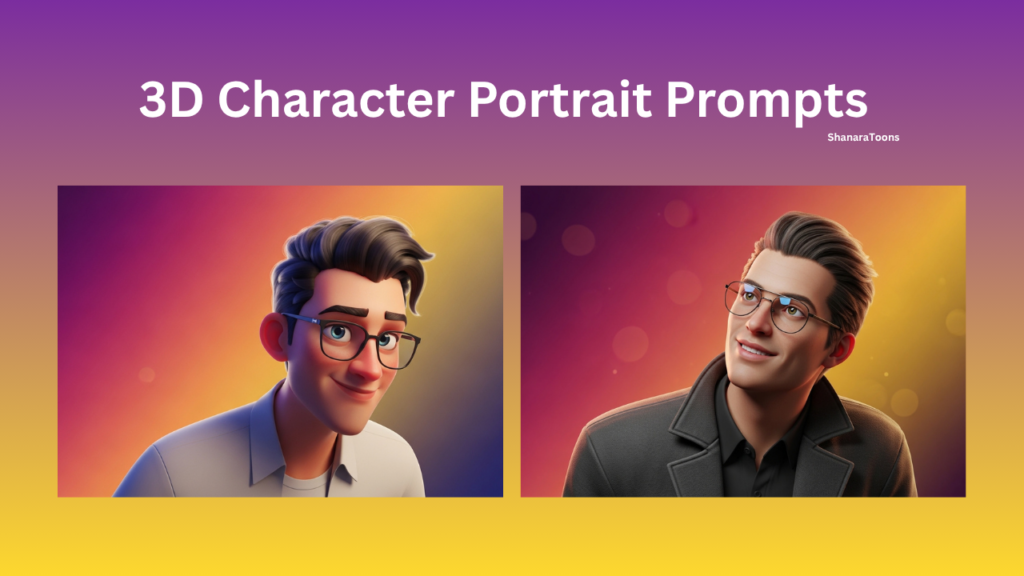
This style is not just about 3D rendering. It depends on lighting, placement, and expression working together. The subject should feel alive, not posed.
The slight lean into the frame adds motion. It breaks the static look and makes the portrait feel more natural.
Main AI Prompt
Create a high-end 3D character portrait inspired by modern animated films, keeping facial identity accurate and recognizable while translating it into a polished cinematic style. Ignore any pose from the reference and compose a chest-up view with the subject placed toward the lower-right, slightly leaning in as if entering the frame, with a gentle head tilt and a warm, confident smile. The character should have expressive eyes with natural catchlights, stylized yet believable proportions, and realistic skin shading with subtle subsurface scattering. Dress the subject in a clean, contemporary outfit with minimal design and realistic fabric detail, along with modern eyewear featuring soft reflections. Use a smooth studio gradient background transitioning diagonally from deep magenta (top-left) to orange (center) to golden yellow (bottom-right), with a soft bokeh-like finish. Apply soft, diffused lighting from the upper right with balanced fill light from the left and gentle global illumination for depth. Render using high-quality PBR techniques with ultra-detailed textures, smooth anti-aliasing, and cinematic color grading, ensuring a sharp, vibrant 4:5 composition with no artifacts, text, or watermark.

How Positioning Changes the Frame
Placing the subject in the lower-right creates space. It avoids a centered, predictable layout.
The slight lean adds movement. It feels like the subject is entering the frame.
The head tilt softens the look. It keeps the expression approachable.
The empty space balances the composition. It prevents visual crowding.
Lighting and Surface Detail
Soft light from the upper right defines the face. It creates gentle highlights.
Fill light on the left removes harsh shadows. This keeps the skin smooth.
Subsurface scattering adds realism. It makes the skin look natural, not plastic.
The gradient background adds color depth. It supports the subject without distraction.
Detailed Variation Prompts
Stronger Cinematic Lighting Version
Create a high-end 3D character portrait with accurate identity and cinematic styling. Use a chest-up composition with the subject placed in the lower-right, slightly leaning into the frame with a gentle head tilt and confident smile. Enhance lighting by increasing contrast between the upper-right key light and left fill light while maintaining soft transitions. Keep expressive eyes with catchlights and realistic skin shading with subsurface scattering. Use a clean modern outfit with realistic fabric texture and subtle reflections on eyewear. Maintain a diagonal gradient background from deep magenta to orange to golden yellow with soft bokeh. Apply high-quality PBR rendering, smooth anti-aliasing, and cinematic color grading. 4:5 aspect ratio, ultra-detailed.
Minimal Clean Background Version
Create a cinematic 3D portrait with accurate identity and stylized realism. Keep the subject positioned in the lower-right with a slight lean and soft smile. Maintain expressive eyes and natural skin shading with subsurface scattering. Simplify the gradient background with smoother transitions and reduced bokeh effect while keeping the magenta to yellow color flow. Use soft diffused lighting with balanced fill light. Keep outfit minimal and modern with clean fabric detail and subtle eyewear reflections. High-quality PBR rendering, smooth textures, 4:5 composition.
High Detail Texture Version
Create a high-end 3D character portrait with enhanced texture detail. Maintain identity accuracy and cinematic composition with the subject in the lower-right, leaning slightly into the frame with a warm smile. Increase realism in skin shading with detailed subsurface scattering and fine surface texture. Emphasize fabric detail in the outfit and sharper reflections in eyewear. Keep expressive eyes with strong catchlights. Maintain gradient background from magenta to orange to yellow with soft bokeh. Use advanced PBR rendering, high-resolution textures, and cinematic color grading. 4:5 aspect ratio, ultra-detailed.
Common Mistakes in This Style
- Placing the subject in the center
- Using flat lighting with no depth
- Over-smoothing skin texture
- Adding too many outfit details
- Using dull or flat background colors
Better Output Direction
- Keep composition slightly off-center
- Use soft but directional lighting
- Maintain realistic skin shading
- Keep outfit simple and clean
- Regenerate to refine facial expression
Final Visual Feel
The final image should feel cinematic and polished. The subject looks natural but stylized. The lighting and color create depth, while the composition keeps the frame dynamic and clean.